Privacy-Friendly Chrome Extension: Generate Emails with ChatGPT AI
Are you tired of spending hours crafting the perfect email or message? Look no further. Introducing the
privacy
-friendly
Chrome extension
that leverages the power of ChatGPT AI. With this innovative tool, you can effortlessly generate entire emails and messages in a matter of seconds. Whether you're writing for work or personal purposes, this extension has got you covered.
Why Choose Our Chrome Extension?
Our Chrome extension stands out from the competition for several reasons:
-
Highest Quality Responses:
Our AI-generated responses are of the highest quality, surpassing all other tools in the market. Say goodbye to generic and mundane messages.
-
All Sites Supported:
Whether you're writing an email, a blog post, or a forum response, our extension works seamlessly on all websites. It is designed to enhance your writing experience across the web.
-
Gmail Support:
If you're a Gmail user, you're in luck. Our extension provides enhanced support for Gmail, making it even more efficient and effective.
-
All Languages Supported:
No matter which language you prefer, our extension has got you covered. From English to German, French to Spanish, and many more, you can generate emails and messages in any supported language.
How to Use our Extension on All Sites
Using our extension on any website is a breeze. Just follow these simple steps:
-
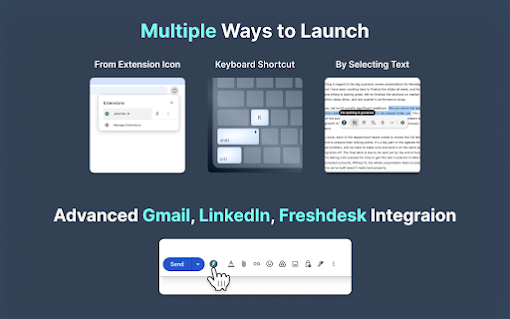
Click on the extension icon located in your browser's toolbar.
-
A popup window will appear.
-
Briefly enter what you want to write about and hit the "Generate Response" button.
How to Use our Extension on Gmail
Using our extension on Gmail is seamless and efficient. Follow these steps to generate email replies or compose new emails:
Generate Email Reply in Gmail:
-
Go to Gmail and open the email you want to reply to.
-
Click the ChatGPT Writer extension button in the Gmail reply box.
-
Briefly enter what you want to reply to and hit the "Generate Reply" button.
Generate a New Email in Gmail:
-
Go to Gmail and click on the compose new email button.
-
Click the ChatGPT Writer extension button in the Gmail textbox.
-
Briefly enter what you want to write an email about and hit the "Generate Email" button.
Using our Extension on Brave Browser
If you are a user of the privacy-focused Brave browser, you can also enjoy the benefits of our extension. Just follow these steps:
-
Go to
brave://settings/shields
.
-
Disable the option "Prevent sites from fingerprinting me based on my language preferences".
Frequently Asked Questions
Which languages does the extension support?
Our extension supports all popular languages. Simply mention the language in the text prompt, and the AI will generate the email or message accordingly. For example, you can request to "Write an email in German language about an internship opportunity."
What data is shared with the AI model?
When writing a new email, the data sent to the AI model is solely the user prompt. When replying to an email, the data sent includes the previous email's text content (which can be edited to remove sensitive information) and the user prompt.
What is our privacy policy?
We prioritize your privacy and take it seriously. We do not save your emails or any other messages on our servers. The context of the email or message is solely used for the purpose of generating the response and nothing else. Additionally, we do not utilize any third-party cookies, trackers, or similar technologies.
Experience the power of ChatGPT AI and revolutionize your writing with our privacy-friendly Chrome extension. Try it today and see the difference!






















30 Reviews For This Extension
Looks promising. great tool.
As Windows with its "point and click" and "cut and paste" was to the computer at its time so is the ChatGPT integrated Writer suite. This Extension changes the game of computing. We've entered into the 3rd Epoch of Computing... DOS-> Windows->ChatGPT Writer Very nice...
I can rate 11/10 6/5 What a wonderful platform. I am very grateful i found you. Thank you
Just started using this, it's seems pretty promising. I'll come with additional feedback as I get more use to sing it
keep your signups
Veyy helpful and effective tool.
Installed, first thing I see is a menu with "pricing". The extension isn't listed with "in app purchase" that's dishonest.
Really bad extension.
I recommend TinaMind even more.
i love it!
I agree with the other reviewers. While the extension is well designed and well integrated into AI-assisted authoring, the free plan only allows 15 uses per month, and the Pro plan is too expensive ($16/month), especially if you're already paying for ChatGPT Plus.
like it
it changes what I am saying. Requests for meetings and ad things that are not true.
The functionality is too simple and the price is too expensive, so I switched to TinaMind. It has more powerful features and is more affordable.
ChatGPT Writer has made writing emails and messages much easier for me. It works smoothly with Gmail, helping me quickly write replies that fit the conversation. The extension lets me choose from different AI models like GPT-4o, Claude Sonnet, and Gemini, so I always get helpful responses. I also like that I can adjust the tone and length of the messages, making them more personal. Plus, it's lightweight and doesn't slow down my browser. Overall, ChatGPT Writer is a great tool for improving writing and saving time.
Super expensive. Can't write on webpages as it may look like it does. It's not a writer. It's just another window for ask and answers with no connection nor interaction with the page you are.
The features were too simple and the price was too high, so I switched to TinaMind. It's more powerful and cheaper.
The prices are ridiculous. Mate, I’m already paying $20 for ChatGPT and have access to Copilot, Claude Sonnet, Gemini, etc. Why would you think I’d pay another $16 for a popup window?
Another data harvester. Removed and blacklisted.
Another one of those "Subscribe to use another subscription" garbage.. I swear I am about to start making these products and free to use so all these penny pincher companies will go under. Paying to use something else that you pay for should not be a thing and we should stop supporting this. Otherwise in 20 years youll have to have a subscription to use a subscription to use a subscription to use software that you pay for and also have to subscribe in order to stop seeing ads. Can only use 15 times a month for free, so don't even bother.
Best best best now my report are perfect ...
The best extension to boost any type of your writing (emails, long form content, improve & rewrite text, change tone etc) as the time being.
It's too simple. I still prefer TinaMind, which is even more powerful.
This extension has access to each and every site you visit and is also privately storing all text input in the background including Passwords, Credit card numbers and so on.
industrisation
good
ChatGPT has been an incredible resource for me, especially when it comes to writing clear and concise emails, reports, and notifications. This tool has helped me organize my thoughts more effectively and communicate with confidence. I’m thrilled to have such a helpful tool at my fingertips!
ChatGPT Writer has been a huge time-saver for me. It generates accurate and context-aware responses, making emails and messages a breeze. The seamless Chrome integration is fantastic. Highly recommend for anyone looking to boost productivity!
The writing feature is pretty good, but it's too basic. To access additional features, you need to install other extensions. I switched to TinaMind, which offers more powerful and comprehensive features.
no okay